



How to Automate Cloud Deployments Without Risk
A release that succeeds in staging but fails in production can cost more than an afternoon of engineering time. It can interrupt customer service, create security exposure, and force teams into rushed troubleshooting. Knowing how to automate cloud deployments means building a controlled delivery system that makes changes repeatable, visible, and recoverable - not simply pushing code faster.
For small and midsized businesses, deployment automation is often the point where cloud investments begin delivering consistent operational value. It reduces dependency on individual administrators, limits configuration drift, and gives engineering teams a reliable path from a proposed change to a verified production release. The right approach depends on your applications, compliance requirements, team maturity, and tolerance for downtime, but the core principles remain consistent.
Start With a Deployment Baseline
Before automating anything, document how a deployment works today. Many organizations discover that a supposedly simple release involves manual server changes, undocumented scripts, credentials stored in multiple places, and approval steps that happen in chat messages. Automating a broken process only makes mistakes happen more quickly.
Map the full path from source code commit to production. Include application builds, database changes, infrastructure updates, security checks, configuration management, approvals, and rollback actions. Identify who owns each stage and where handoffs create delays or risk.
This baseline also helps determine what should be automated first. A customer-facing application deployed weekly has different priorities than a regulated internal system released quarterly. High-frequency services usually benefit first from automated build, test, and deployment workflows. Environments with frequent infrastructure changes may see the greatest return from infrastructure as code.
How to Automate Cloud Deployments With CI/CD
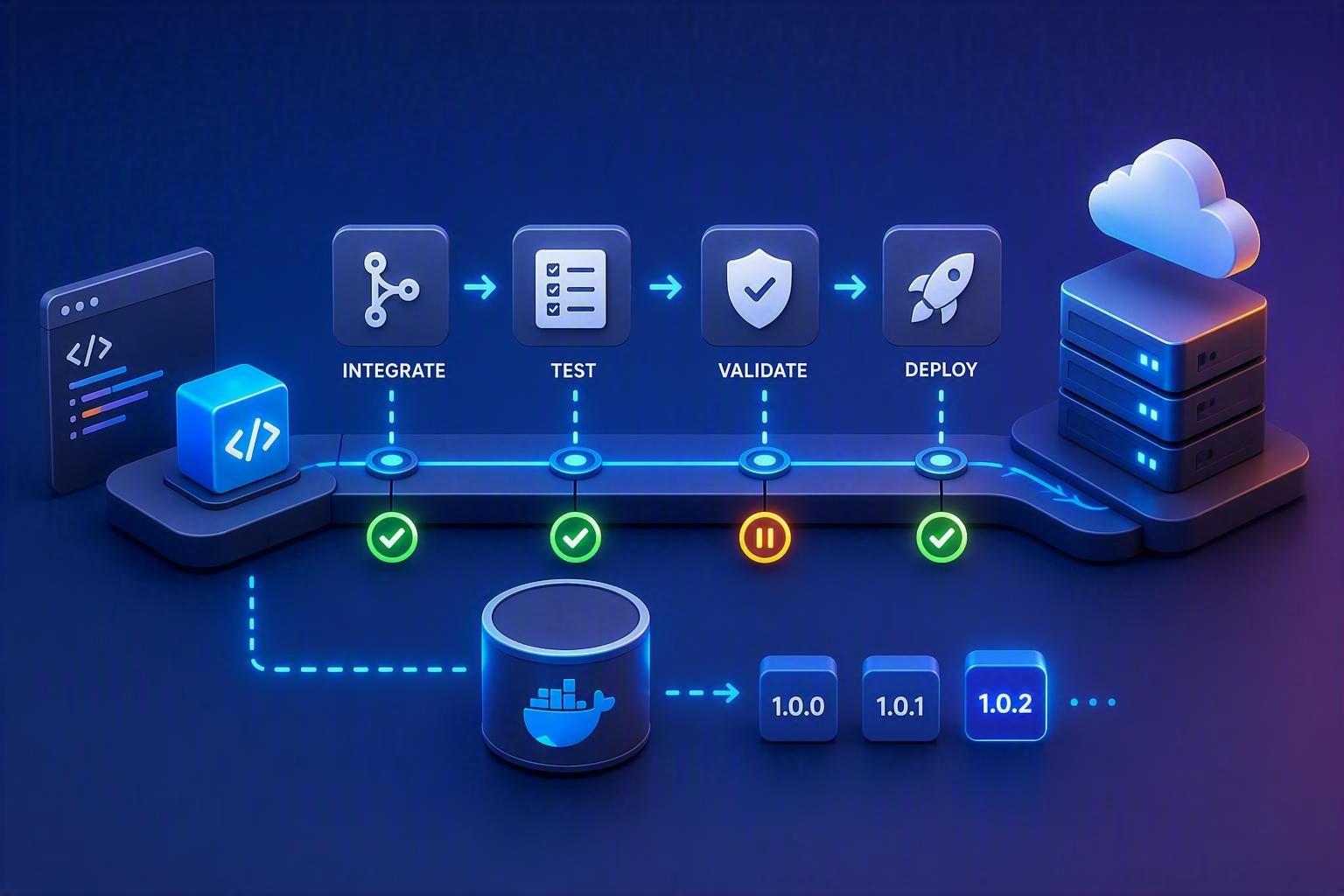
A CI/CD pipeline provides the execution framework for automated deployments. Continuous integration validates each code change against shared standards. Continuous delivery prepares approved changes for release. Continuous deployment takes the final step automatically when defined conditions are met.
The distinction matters. Full continuous deployment is not the correct choice for every workload. A public web application with strong automated test coverage may safely deploy changes after successful validation. A system that processes financial data or supports regulated operations may require a documented human approval before production. Automation should enforce the appropriate control, not remove necessary governance.
Build once and promote the same artifact
A dependable pipeline produces an immutable artifact, such as a container image or packaged application, once. That exact artifact should move through development, test, staging, and production environments. Rebuilding separately for each environment introduces the risk that production receives something different from what was tested.
Store artifacts in a controlled registry, tag them clearly, and retain enough history to support investigation or rollback. Use version numbers that allow operations teams to identify what changed and when it was released.
Treat validation as a release gate
A deployment pipeline should stop changes that fail defined quality or security checks. At a minimum, this typically includes unit tests, integration tests, dependency scanning, code quality checks, and infrastructure validation. For cloud environments, add checks for insecure identity policies, exposed storage, overly permissive security groups, and configuration that violates internal standards.
Testing should reflect business risk. A marketing site may need browser and performance testing. A transactional platform may require database migration testing, API contract validation, and failure recovery scenarios. The objective is not to add every possible test on day one. It is to automate the checks that catch the failures your business cannot afford.
Define Infrastructure as Code
Manual cloud configuration is difficult to audit and nearly impossible to reproduce at scale. Infrastructure as code replaces ad hoc console changes with version-controlled definitions for networks, compute resources, identity permissions, databases, monitoring rules, and more.
Terraform is often a practical choice for organizations operating across AWS and other platforms because it provides a consistent declarative workflow. AWS-native tooling can also be appropriate when a team is standardized on AWS services. Ansible can complement these tools by managing operating system configuration and application setup where needed.
The specific tool matters less than the operating model. Infrastructure changes should be reviewed through pull requests, validated before execution, and applied through a controlled pipeline. This creates an audit trail while making environments easier to recreate after an incident or expansion.
Separate reusable modules from environment settings
Avoid copying large infrastructure files for development, staging, and production. Instead, create reusable modules for common patterns, such as a secure application service, a private database, or a monitored virtual machine. Keep environment-specific values - instance sizing, domain names, scaling limits, and approved network ranges - in managed configuration.
This structure reduces drift without pretending every environment is identical. Production may legitimately require higher availability, tighter access controls, or additional monitoring. The key is making those differences intentional and reviewable.
Build Security Into the Pipeline
Deployment automation has broad access to cloud resources, which makes it a high-value target. Treat the pipeline as part of your security perimeter. Do not rely on long-lived administrator credentials saved in a CI/CD platform or script.
Use short-lived, role-based access wherever possible. In AWS, a pipeline can assume narrowly scoped IAM roles for specific deployment tasks. Store secrets in an approved secrets management system, rotate them on a defined schedule, and ensure logs never expose credentials, tokens, or sensitive configuration values.
Security controls should be automated early rather than added after an incident. Scan container images and dependencies before release. Check infrastructure plans for policy violations. Require peer review for high-impact changes, especially identity, networking, encryption, and production data resources. For organizations with compliance obligations, preserve pipeline logs, approvals, test evidence, and deployment records as part of the audit trail.
Use Safe Production Release Patterns
A successful deployment is not necessarily a safe release. The application may deploy correctly but fail under real traffic, interact poorly with a dependent service, or introduce an unexpected performance issue. Release patterns help limit the blast radius.
Blue-green deployments maintain two production-ready environments and shift traffic after verification. They provide a clear rollback path but can increase infrastructure cost. Canary deployments send a small percentage of traffic to the new version before broader rollout. They are especially useful for high-volume services, although they require meaningful monitoring and traffic management. Rolling deployments replace instances gradually and are often a cost-effective default for stateless applications, but rollback can be more complicated if versions run side by side.
Database changes require added discipline. Use backward-compatible migrations whenever possible, deploy schema changes before code that depends on them, and avoid combining destructive data changes with an application release unless a tested recovery plan exists. Database rollback is rarely as simple as reverting application code.
Make Observability Part of Every Release
Automation without observability creates a faster path to uncertainty. Every deployment should emit a clear event that teams can correlate with application errors, infrastructure health, user experience, and cost changes.
Establish a release dashboard that shows deployment status alongside key service indicators: error rates, response time, saturation, availability, and relevant business transactions. Tools such as New Relic can help correlate code releases with production behavior, while AWS monitoring services provide infrastructure-level telemetry and alerting.
Define measurable release health criteria before deployment. For example, automatically pause or roll back a release if error rates exceed a threshold, latency rises beyond an agreed limit, or critical health checks fail. Thresholds should be tuned to the service. An aggressive rollback setting can create unnecessary churn during normal traffic variation, while a loose threshold can allow a genuine incident to spread.

Establish Ownership and Change Discipline
Cloud deployment automation is a shared operating capability, not a one-time engineering project. Development teams need clear standards for tests and application configuration. Operations teams need reliable runbooks and visibility. Security teams need policy enforcement and evidence. Business leaders need confidence that releases support customer commitments without creating avoidable risk.
Define who can approve production changes, who owns pipeline maintenance, and who responds when automated checks fail. Review deployment metrics regularly, including lead time, change failure rate, recovery time, and the number of manual interventions. These measures reveal whether automation is improving delivery or merely moving work into a different queue.
A phased implementation is usually the most effective path. Start with one application or service that has a clear owner and manageable risk profile. Standardize the pipeline, infrastructure definitions, security controls, and monitoring model there. Then use the lessons learned to create repeatable patterns for the rest of the environment.
The goal is not a pipeline with the most tools or the fewest human decisions. It is a cloud delivery process your team can trust when a critical change must move quickly, at 2 p.m. on a normal Tuesday or during the pressure of an incident.
User Story: From Risky Releases to Reliable Deployments
A growing SaaS company was releasing application updates twice a month using a largely manual process. Developers would hand off deployment scripts to operations staff, infrastructure changes were made directly through the cloud console, and production releases depended on a handful of experienced team members being available. Most deployments were successful, but when issues occurred, troubleshooting could take hours because no one had complete visibility into what changed or when.
After a failed production deployment caused several hours of customer-facing service disruption, the company implemented a structured cloud deployment automation strategy. They introduced infrastructure as code, standardized CI/CD pipelines, automated security and quality checks, and adopted rolling deployments with automated rollback criteria.
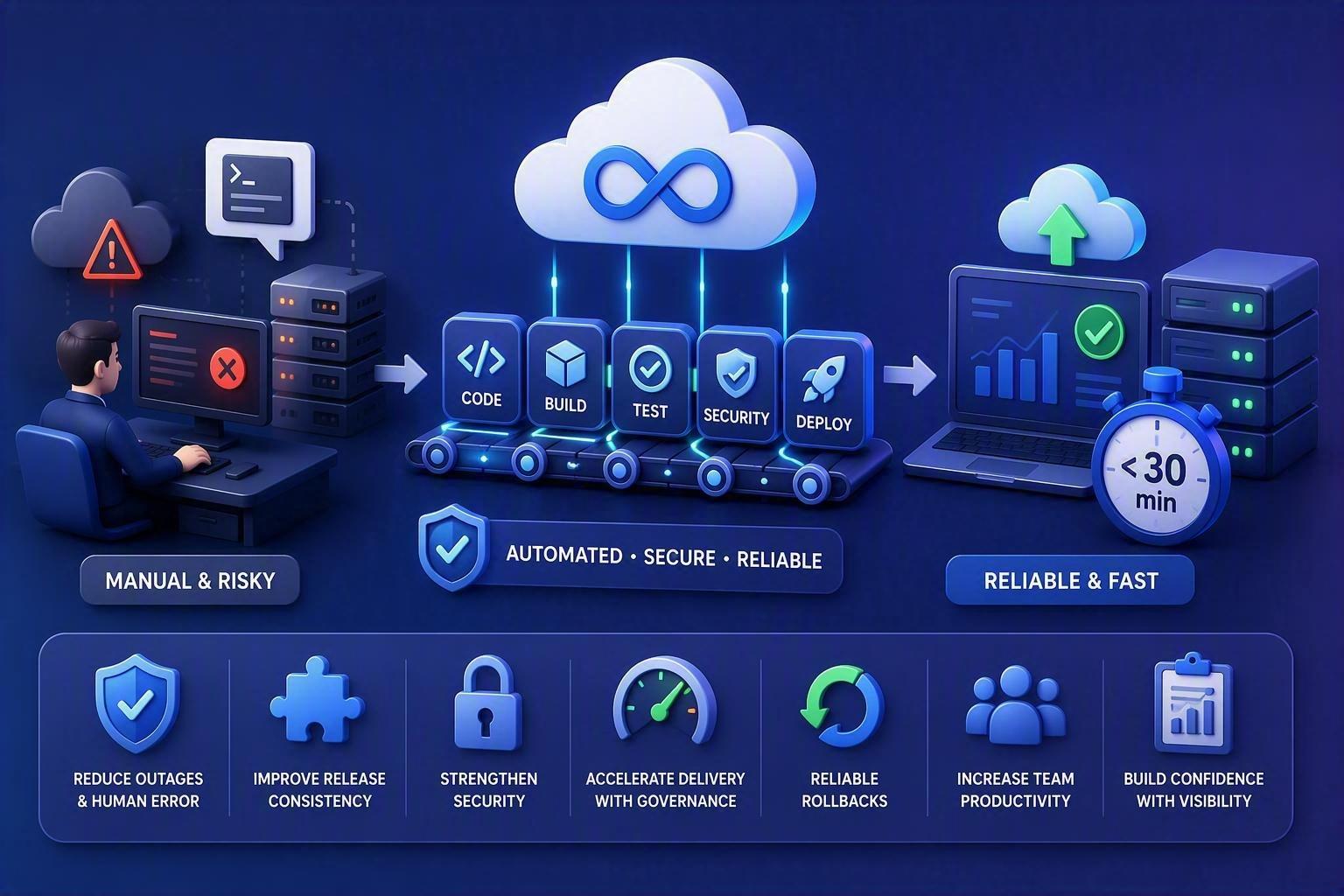
Within a few months, deployment times dropped from several hours to less than 30 minutes, release consistency improved significantly, and the team gained confidence to deploy smaller, lower-risk changes more frequently. More importantly, they reduced operational risk by ensuring that every deployment followed the same validated process, regardless of who initiated it.
This scenario is increasingly common for small and midsized businesses as cloud environments grow in complexity. The challenge is rarely releasing faster. It is creating a delivery process that remains reliable, secure, and recoverable under pressure.
Why This Matters
Cloud deployment automation is not simply a technical improvement. It is a business capability that directly affects reliability, security, customer experience, and operational efficiency.Without a structured deployment process, organizations often face inconsistent releases, environment drift, undocumented changes, and prolonged recovery times when incidents occur. As cloud environments scale, these risks become more expensive and more difficult to manage.By automating deployments through CI/CD pipelines, infrastructure as code, integrated security controls, and observable release processes, organizations can:
-
Reduce deployment-related outages and human error.
-
Improve release consistency across development, staging, and production environments.
-
Strengthen security by enforcing policy checks and eliminating unmanaged credentials.
-
Accelerate delivery without sacrificing governance or compliance requirements.
-
Create reliable rollback paths when changes introduce unexpected issues.
-
Increase team productivity by reducing manual operational work.
-
Build stakeholder confidence through greater visibility and auditability.
For SMBs in particular, deployment automation helps transform cloud infrastructure from a collection of manually managed resources into a predictable operating platform. The result is not just faster releases, but a cloud environment that can support growth, changing business requirements, and critical customer-facing services with less risk.
Frequently Asked Questions (FAQ)
1. What are the main benefits of automating cloud deployments?
Automating cloud deployments improves consistency, reduces human error, minimizes configuration drift, and creates a reliable path from development to production. It also helps organizations reduce dependence on individual administrators, improve auditability, and accelerate releases without sacrificing control.
2. Why is documenting the current deployment process important before automation?
Documenting the existing process helps identify manual tasks, hidden dependencies, approval bottlenecks, and security risks. Automating an inefficient or undocumented process can amplify existing problems rather than solve them, making a clear deployment baseline essential.
3. Should every organization implement fully automated continuous deployment?
No. While continuous deployment can work well for applications with strong automated testing and lower risk profiles, regulated systems or applications handling sensitive financial or customer data may require manual approval steps. Automation should support governance requirements, not eliminate necessary controls.
4. What role does Infrastructure as Code (IaC) play in deployment automation?
Infrastructure as Code enables teams to manage cloud resources through version-controlled configuration files instead of manual console changes. This approach improves consistency, supports auditing and compliance, reduces configuration drift, and makes environments easier to reproduce and recover.
5. How can organizations reduce risk when releasing changes to production?
Organizations can use release strategies such as blue-green, canary, or rolling deployments to limit the impact of failures. Combined with automated testing, observability, monitoring, rollback mechanisms, and clear ownership, these practices help teams detect issues quickly and maintain service reliability.

Written by Yavor Y. Zlatev
CEO & Founder at Advanced Vision IT Ltd | Published on
Yavor advises executive leadership teams on cybersecurity strategy, NIS2 compliance, and cloud operating models to build resilient IT environments.