



How to Use AWS Savings Plans Effectively
A cloud bill can look stable for months, then jump after a product launch, migration, or poorly sized autoscaling change. Knowing how to use AWS Savings Plans effectively turns that volatility into a controlled financial decision without giving up the flexibility that made AWS attractive in the first place.
Savings Plans can reduce eligible compute costs substantially compared with On-Demand pricing, but they are not a discount button. They are a commitment to a consistent hourly spend over one or three years. The best outcomes come from committing only to usage that is proven, durable, and continuously monitored.
How to Use AWS Savings Plans Effectively
The core principle is simple: commit to your baseline compute demand, not your peak demand. Your baseline is the level of eligible usage that continues even during quiet periods, maintenance windows, and normal variations in traffic. Peak capacity should usually remain flexible through On-Demand instances, Spot Instances, or architectural changes.
For example, a SaaS platform may run a steady production database-adjacent application tier, API services, and worker nodes around the clock. Those resources create a predictable compute floor. A seasonal reporting workload, a short-term migration environment, or a development cluster that is shut down overnight does not belong in the same commitment calculation.
This distinction matters because AWS charges for the Savings Plan commitment every hour of the term, whether eligible usage consumes it or not. Undercommitting leaves some savings on the table. Overcommitting creates recurring waste that can be harder to reverse than an oversized instance.
Start with clean cost and usage data
Do not purchase a Savings Plan from a single month of billing data. Review at least three to six months of hourly usage, and use a longer period if your business has seasonal demand. Look at actual eligible compute spend by account, region, instance family, operating system, and workload environment.
For organizations using AWS Organizations, assess demand at the consolidated billing level before making decentralized purchases. Savings Plan benefits can apply across linked accounts when sharing is configured, which often produces better utilization than separate commitments in every account. This also requires sound cost allocation tags and account ownership. If no one can explain which team owns a workload, it is difficult to forecast its future demand responsibly.
Before modeling commitments, remove obvious waste. Terminate abandoned instances, rightsize consistently underutilized services, schedule nonproduction resources, and address idle load balancers, storage, and data transfer separately. Savings Plans reduce compute pricing. They do not fix inefficient architecture.
Choose the Right Savings Plan Type
AWS Savings Plans are designed for different levels of flexibility and discount potential. The right choice depends on how often your infrastructure changes and how tightly you can predict its future shape.
Compute Savings Plans
Compute Savings Plans offer the broadest flexibility. They can apply to eligible usage across EC2 instance families, sizes, regions, operating systems, and tenancy options, as well as eligible AWS Fargate and Lambda usage. For many small and mid-sized businesses, this is the safest default because cloud environments evolve. Teams may move from one instance family to another, shift regions, containerize an application, or replace long-running instances with serverless workloads.
The trade-off is that Compute Savings Plans generally offer lower discounts than EC2 Instance Savings Plans. That trade-off is often worthwhile when modernization, migration, or variable deployment patterns are part of the operating plan.
EC2 Instance Savings Plans
EC2 Instance Savings Plans provide deeper discounts in exchange for a narrower commitment. They are tied to a specific instance family in a specific AWS Region, although they retain some flexibility around instance size and operating system within the qualifying parameters.
This option can fit a mature, stable workload with well-understood demand, such as a production fleet that has run consistently on the same instance family for several quarters. It is less appropriate for an environment preparing for a major migration, Kubernetes redesign, Graviton adoption, or database modernization. A larger discount is not a better deal if it prevents the engineering team from choosing the right infrastructure later.
AWS also offers service-specific plans for certain services. Treat those as specialized financial instruments, not replacements for a broader compute strategy. Validate which usage is eligible and how it fits your existing commitment portfolio before purchasing.
Build a Commitment Ladder Instead of One Large Purchase
A common mistake is making one large three-year commitment based on a point-in-time forecast. A more controlled approach is to build a commitment ladder. Commit first to the most stable portion of demand, then add coverage in smaller increments as usage proves durable.
A practical model might commit a conservative portion of the verified baseline through a one-year Compute Savings Plan, then expand coverage after 60 to 90 days of utilization data. Organizations with highly predictable production demand may add selected three-year commitments for their most stable workloads. Organizations in the middle of cloud migration or application modernization should usually favor flexibility, even if the projected discount is lower.
Payment options also affect the decision. All Upfront typically provides the highest discount, while Partial Upfront and No Upfront preserve more cash. The right choice depends on capital planning, not just percentage savings. A lower discount with better liquidity can be more appropriate for a growth-stage business managing hiring, product investment, or a migration program.
Pair Savings Plans with Architecture Discipline
Savings Plans work best as one layer of cloud financial management. Rightsizing, autoscaling, scheduling, storage lifecycle policies, and Spot capacity strategies remain essential. If a workload can safely use Spot Instances, the economics may be better than covering all of it with a Savings Plan. If a nonproduction environment runs only during business hours, scheduling may create more value than a commitment.
This is also where observability matters. CPU utilization alone is not enough to determine the correct instance size. Review memory pressure, request latency, queue depth, database connections, error rates, and scaling behavior. Tools such as AWS CloudWatch and New Relic can expose whether apparent baseline usage is truly required or simply the result of an inefficient configuration.
Infrastructure as code also improves cost control. When Terraform, CI/CD workflows, and tagging standards govern infrastructure changes, teams can identify new recurring demand before it becomes an unplanned billing pattern. That makes Savings Plan decisions more deliberate and reduces surprises after deployments.
FAQ: Using AWS Savings Plans Effectively
Are AWS Savings Plans better than Reserved Instances?
It depends on the workload. Compute Savings Plans are often better for organizations that need flexibility across instance families, regions, Fargate, and Lambda. EC2 Instance Savings Plans can suit stable EC2 usage. Reserved Instances may still have a role in specific scenarios, but Savings Plans are generally easier to align with changing compute environments.
What percentage of AWS usage should be covered by Savings Plans?
There is no universal target. Start with the conservative, always-on portion of eligible usage after removing waste. Many teams increase coverage gradually as they confirm utilization and forecast stability. Covering 100% of compute demand is rarely prudent when traffic, deployments, or architecture may change.
Can Savings Plans save money on every AWS service?
No. Savings Plans apply to eligible compute usage, not the full AWS bill. Services such as storage, data transfer, support, and many managed services require separate optimization strategies. Review billing data carefully rather than applying compute savings assumptions to total cloud spend.
What happens if usage falls below the commitment?
You still pay the agreed hourly commitment for the remainder of the term. That is why conservative forecasting, phased purchases, and ongoing utilization reviews are critical. A Savings Plan is a financial commitment, not capacity that can be returned when demand changes.
Should startups buy three-year Savings Plans?
Only when the underlying workload is exceptionally stable and the business can support the commitment. A startup with rapid product changes, uncertain growth, or an active migration may benefit more from one-year Compute Savings Plans and a phased coverage strategy. The goal is to protect cash flow and engineering flexibility while capturing savings from proven demand.
The strongest Savings Plan strategy is not the one with the highest projected discount. It is the one your organization can sustain through releases, growth, optimization work, and changing business priorities. Treat commitments as part of cloud operations, and review them with the same discipline applied to security, availability, and performance.
Monitor Utilization and Coverage Every Month
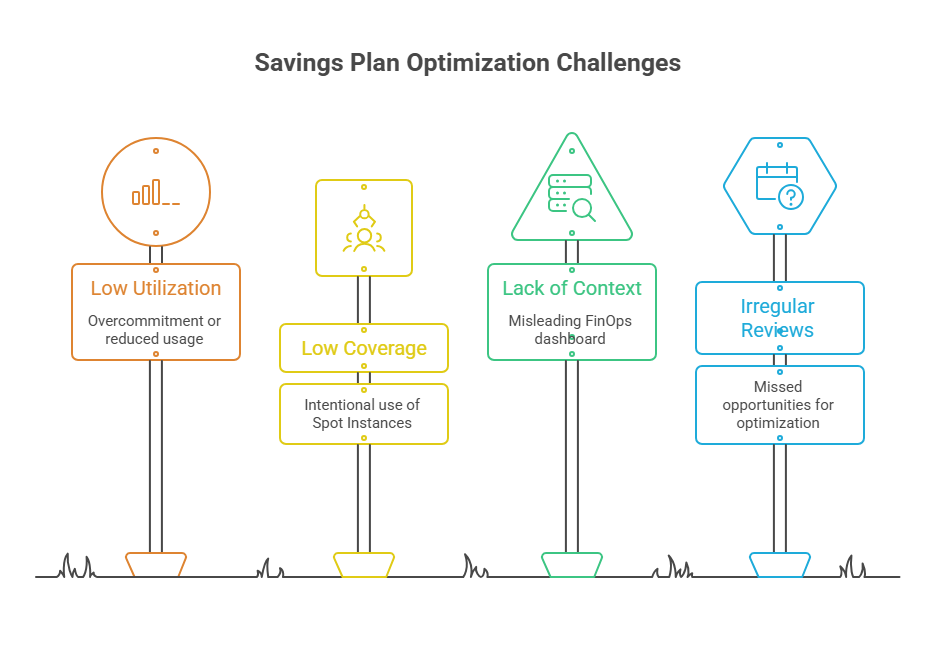
Savings Plans are not a set-and-forget purchase. Monitor two measures: utilization and coverage.
Utilization shows how much of the hourly commitment is being consumed. Low utilization can indicate overcommitment, workload shutdowns, a regional shift, or an architectural change that reduced eligible compute usage. A plan that is consistently below full utilization deserves investigation.
Coverage shows how much eligible On-Demand spend is receiving Savings Plan benefits. Low coverage is not automatically a problem. It may reflect intentional use of Spot Instances, short-lived project environments, burst traffic, or workloads that are not stable enough to commit. It becomes an opportunity when steady On-Demand spend persists month after month.
Review these metrics alongside engineering changes. A FinOps dashboard without deployment context can be misleading. For example, a utilization decline may be a positive outcome if a team eliminated idle capacity. Conversely, high utilization may hide avoidable cost if workloads are oversized or lack autoscaling controls.
Set a regular review cadence involving finance, cloud operations, and engineering leadership. Monthly reviews work for most organizations, while rapidly changing environments may need biweekly checks during a migration or release cycle. Bring cost anomaly data, usage forecasts, planned architecture changes, and upcoming contract decisions into the same conversation.

Written by Yavor Y. Zlatev
CEO & Founder at Advanced Vision IT Ltd | Published on
Yavor advises executive leadership teams on cybersecurity strategy, NIS2 compliance, and cloud operating models to build resilient IT environments.