



How to Implement Zero Trust Without Slowing Work
A stolen Microsoft 365 session, an unmanaged laptop, or an overly broad AWS role can give an attacker more access than a traditional network perimeter was designed to prevent. Learning how to implement zero trust is not about buying a single security product. It is an operating model that continuously verifies identities, devices, workloads, and access requests before granting the minimum access needed.
For small and mid-sized businesses, the goal is practical risk reduction without making daily work painful. A well-executed zero trust program protects cloud applications, remote employees, branch offices, development environments, and third-party access while giving IT teams clearer evidence of who accessed what, from where, and under which conditions.
Start with the business risks, not a tool shortlist
Zero trust initiatives often stall when teams start by comparing platforms before they understand their highest-risk access paths. Begin with the systems that would create meaningful operational, financial, or compliance consequences if compromised. For many organizations, that means email, identity providers, finance applications, customer data, source code, AWS accounts, administrative tools, and backup systems.
Map how users, service accounts, contractors, and applications reach those resources. Document where credentials are stored, which accounts have administrative privileges, what devices are permitted, and whether access is still available after an employee changes roles or a vendor engagement ends. This exercise usually exposes the gaps that matter most: shared admin accounts, legacy VPN access, inactive users, flat internal networks, and cloud permissions that have grown without review.
Set measurable outcomes before implementation begins. Examples include requiring phishing-resistant multi-factor authentication for privileged users, removing standing administrator access, enforcing device compliance for business applications, and centralizing security logs. These outcomes keep the program tied to uptime, reduced breach exposure, audit readiness, and operational efficiency rather than a vague promise to become "zero trust."
How to implement zero trust in practical phases
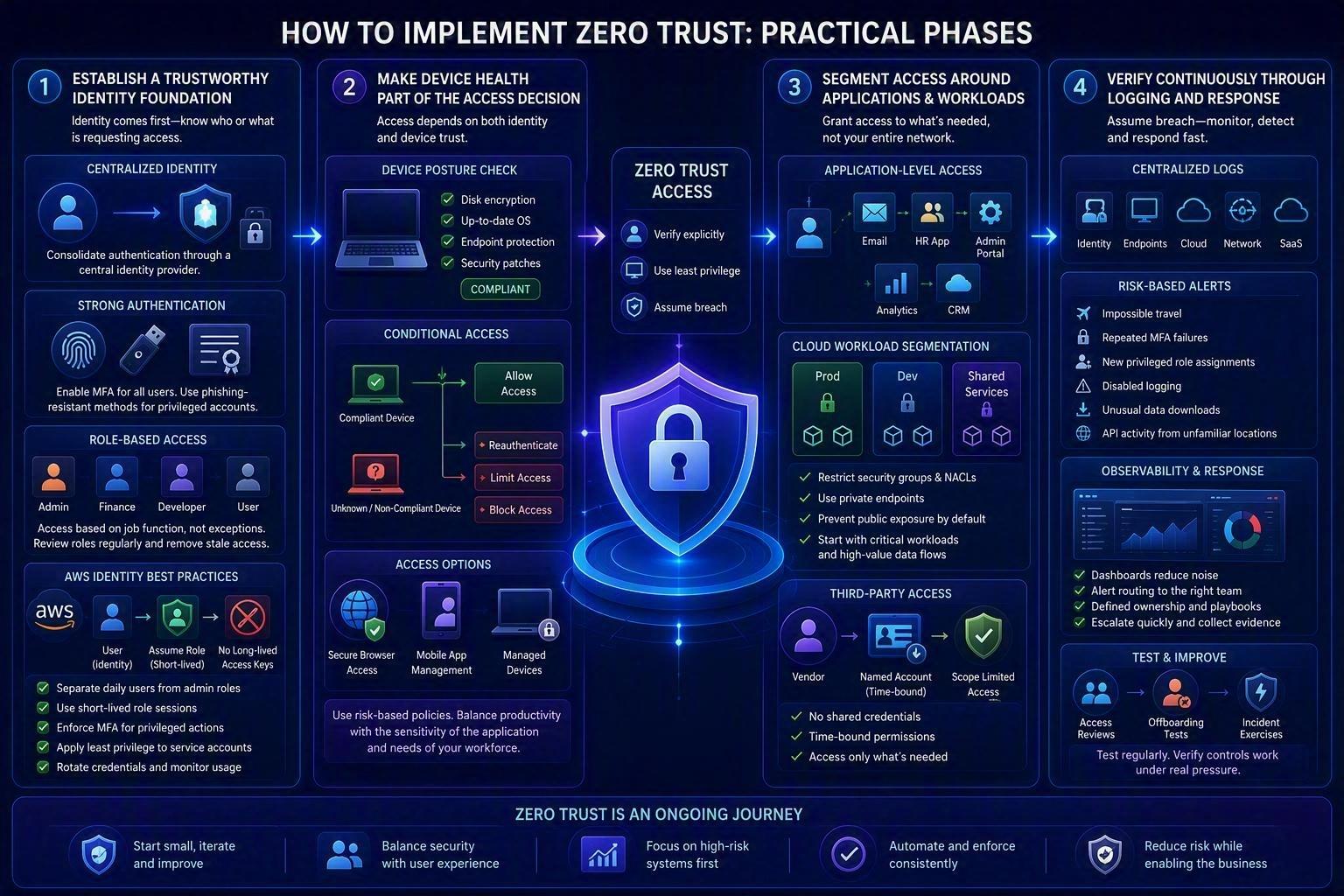
A phased approach is safer than attempting a complete access redesign in one project. The right sequence depends on your environment, but identity should usually come first because nearly every other control relies on knowing who or what is requesting access.
Establish a trustworthy identity foundation
Every human and nonhuman identity should be unique, managed, and traceable. Consolidate authentication through a central identity provider where possible, then enable multi-factor authentication for all users. Privileged accounts should use stronger methods such as FIDO2 security keys or certificate-based authentication when supported, since SMS-based codes are more vulnerable to interception and social engineering.
Apply role-based access controls so users receive access based on job function rather than individual exceptions. Then review those roles regularly. Least privilege is not a one-time permission cleanup. Employees change responsibilities, projects end, and temporary access quietly becomes permanent unless it has an owner and an expiration date.
For AWS environments, separate daily user identities from administrative roles. Use short-lived role sessions, enforce MFA for privileged actions, and avoid long-lived access keys wherever a workload can use an IAM role instead. Service accounts need the same attention as employee accounts: clear ownership, narrowly scoped permissions, credential rotation, and monitoring for unexpected use.
Make device health part of the access decision
A valid password and MFA prompt do not make a device safe. A managed laptop with disk encryption, supported operating system versions, endpoint protection, and current patches presents a different risk profile than a personal device that has not been updated for months.
Use endpoint management to define a baseline for corporate devices, then connect compliance signals to conditional access policies. A user accessing email from a compliant device may receive normal access. The same user signing in from an unknown device may be required to reauthenticate, blocked from downloading sensitive files, or limited to browser-based access. The appropriate policy depends on the sensitivity of the application and how mobile your workforce needs to be.
Avoid treating bring-your-own-device access as an all-or-nothing choice. For some teams, secure browser access and mobile application management offer a workable middle ground. For administrators, developers with production access, and employees handling regulated data, company-managed devices are generally the more defensible standard.
Segment access around applications and workloads
Traditional VPNs commonly place remote users on the internal network, where they may be able to discover and reach more systems than their role requires. Zero trust network access shifts the model from network-level trust to application-specific access. Instead of connecting a user to an entire subnet, grant access to a defined application, administrative portal, or service based on identity, device status, and context.
In cloud infrastructure, apply the same principle between workloads. Separate production, development, and shared services accounts. Restrict security groups and network access control lists to required ports and known sources. Use private endpoints where appropriate, and prevent public exposure by default. Microsegmentation does not mean creating thousands of rules on day one. Start with critical workloads and high-value data flows, then tighten controls as visibility improves.
Third-party access deserves its own design. Vendors should receive named accounts, time-bound permissions, and access only to the systems needed for their engagement. Shared credentials and permanent VPN accounts are difficult to audit and unnecessarily expand the attack surface.
Verify continuously through logging and response
Zero trust is incomplete if access decisions cannot be observed and investigated. Centralize logs from identity providers, endpoints, cloud platforms, firewalls, SaaS applications, and critical business systems. Prioritize alerts that identify material changes in risk: impossible travel, repeated MFA failures, new privileged role assignments, disabled logging, unusual data downloads, or API activity from unfamiliar locations.
Observability practices can make this more manageable. Dashboards and alert routing should distinguish normal operational noise from events that require rapid action. A security signal is only useful when someone knows who owns the response, what evidence to collect, and when to escalate.
Run access reviews and incident exercises on a schedule. Test whether an offboarded employee loses access everywhere, whether a compromised endpoint is blocked from sensitive applications, and whether your team can identify an unusual cloud permission change quickly. These tests reveal whether policies work under pressure rather than merely looking complete in a configuration console.
User Story: How a Mid-Sized Company Reduced Risk Without Slowing Employees Down
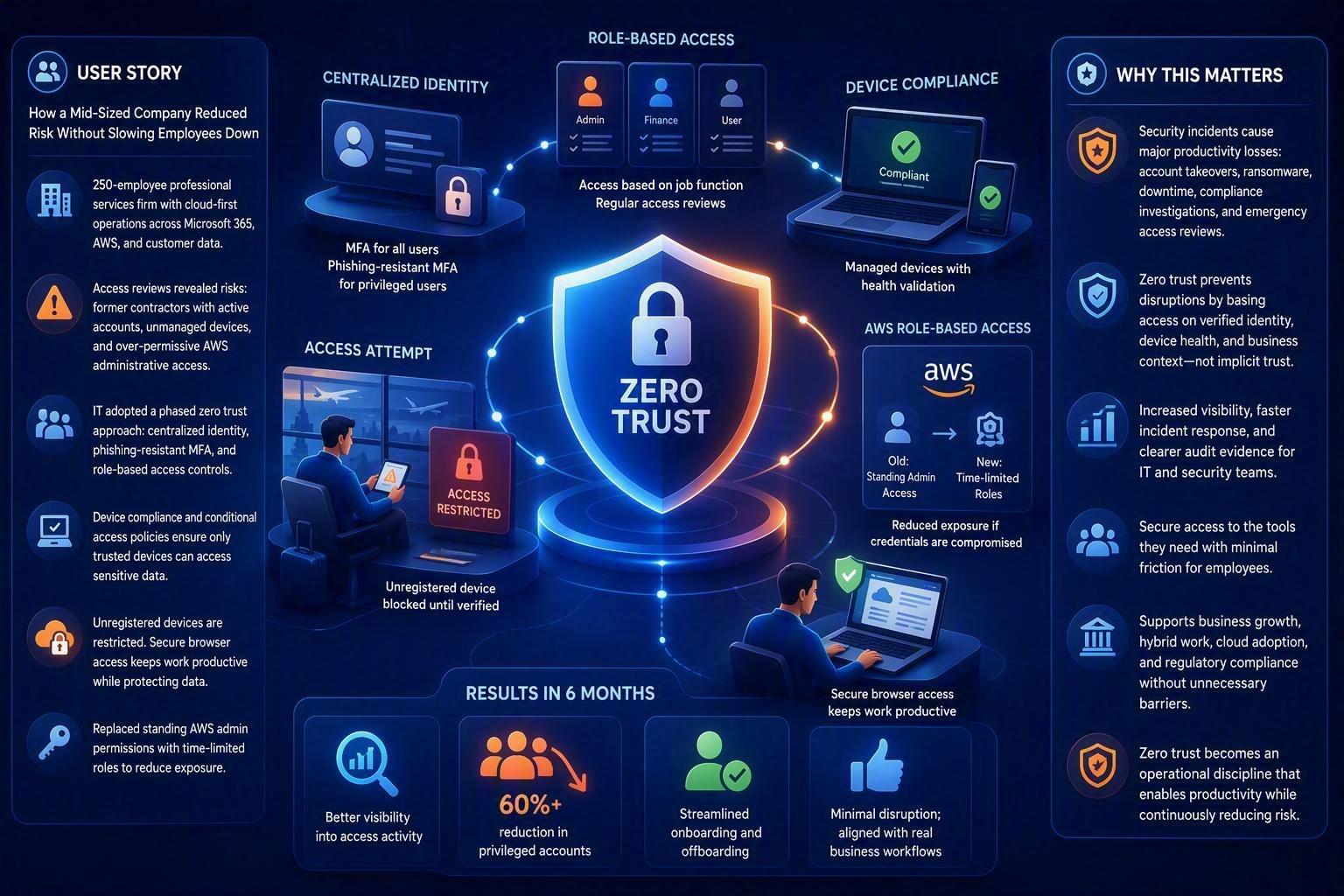
A regional professional services firm with 250 employees had embraced cloud-first operations. Staff accessed Microsoft 365, AWS-hosted applications, and customer data from the office, home, and while traveling. The company already used MFA, but access reviews revealed several risks: former contractors still had active accounts, employees could connect from unmanaged personal devices, and some AWS administrative permissions had expanded over time without formal review.
Rather than launching a large-scale security overhaul, the IT team adopted a phased zero trust approach. They began by centralizing identity management, enforcing phishing-resistant MFA for privileged users, and implementing role-based access controls. Next, they introduced device compliance requirements through endpoint management and linked those controls to conditional access policies.
When an employee attempted to access sensitive client records from an unregistered device while traveling, the system automatically restricted access until the device could be verified. Legitimate work continued through secure browser access, while customer data remained protected. The organization also replaced several standing AWS administrator permissions with time-limited role-based access, significantly reducing exposure if credentials were compromised.
Within six months, the company improved visibility into access activity, reduced privileged accounts by more than 60%, and streamlined user onboarding and offboarding processes. Most importantly, employees experienced minimal disruption because new controls were introduced gradually and aligned with real business workflows.
Why This Matters
Many organizations assume security improvements inevitably create friction for employees. In reality, the biggest productivity losses often come from security incidents themselves: account takeovers, ransomware attacks, unexpected downtime, compliance investigations, and emergency access reviews.
A practical zero trust strategy helps organizations avoid those disruptions by ensuring that access decisions are based on verified identities, device health, and business context rather than implicit trust. When implemented in phases, users gain secure access to the applications they need while IT teams gain stronger visibility, faster incident response capabilities, and clearer audit evidence.
The result is a security model that supports business growth, hybrid work, cloud adoption, and regulatory requirements without forcing employees to navigate unnecessary barriers. Zero trust is most effective when it becomes an operational discipline that enables productivity while continuously reducing risk.
Balance security controls with operational reality
Zero trust can create friction when policies are overly broad or introduced without communication. A blanket block on unmanaged devices may be justified for a regulated environment, but it can disrupt a field team that relies on mobile access. Conversely, allowing every device into every application may preserve convenience while defeating the purpose of the program.
Use risk tiers. High-impact systems such as production consoles, payroll, financial applications, and customer databases should require the strongest authentication, managed devices, and tighter session controls. Lower-risk collaboration tools may permit more flexibility while still requiring MFA and monitoring. This approach focuses security effort where a compromise would hurt most.
Pilot changes with a representative user group before broad enforcement. Measure failed sign-ins, help desk volume, blocked legitimate workflows, and adoption of MFA methods. Clear communication matters: employees are more likely to cooperate when they understand that a new control protects customer information and reduces the chance that one compromised account disrupts the company.

Build zero trust into operations, not just architecture
The most sustainable programs connect security controls to routine IT operations. New employee onboarding should assign the right role and device baseline automatically. Offboarding should revoke sessions, remove group membership, rotate relevant credentials, and preserve audit evidence. Infrastructure changes should move through version-controlled pipelines, with Terraform or Ansible policies reviewed before deployment rather than modified manually in production.
Regular reviews should also examine the cloud cost and performance implications of security decisions. Additional logging, endpoint tooling, private connectivity, and segmentation can increase spend if they are implemented without architecture discipline. The answer is not to reduce visibility. It is to retain high-value telemetry, set sensible data retention periods, and use automation to keep controls consistent across accounts and environments.
For organizations without a dedicated security engineering team, a managed partner can provide the operational layer that makes these controls reliable: policy design, AWS security configuration, endpoint management, monitoring, incident response playbooks, and compliance evidence. Advanced Vision IT approaches zero trust as part of the broader infrastructure lifecycle, so security controls can support modernization instead of becoming a barrier to it.
A practical next step is to choose one high-value application, trace every path into it, and ask a simple question: what evidence should be required before this access is granted? That answer becomes the first policy worth implementing, testing, and improving.
Frequently Asked Questions (FAQ)
1. What is Zero Trust, and why is it important?
Zero Trust is a security model that continuously verifies users, devices, workloads, and access requests before granting the minimum level of access required. It helps organizations reduce the risk of breaches caused by compromised accounts, unmanaged devices, excessive permissions, and other threats that can bypass traditional network security boundaries.
2. Where should organizations start when implementing Zero Trust?
Organizations should start by identifying their highest-risk systems and data, such as email platforms, identity providers, financial applications, customer records, source code repositories, cloud accounts, and backup systems. Understanding how users and applications access these resources helps uncover security gaps and prioritize improvements.
3. Why is identity management considered the foundation of Zero Trust?
Identity is at the core of Zero Trust because every access decision depends on knowing who or what is requesting access. Strong identity controls include centralized authentication, multi-factor authentication (MFA), role-based access control (RBAC), least-privilege permissions, and regular access reviews to ensure users only have the access they need.
4. How does device security affect Zero Trust access decisions?
Zero Trust evaluates the security posture of devices before granting access. Factors such as operating system updates, endpoint protection, disk encryption, and compliance status help determine whether a device should receive full access, limited access, or be blocked entirely from sensitive applications and data.
5. How can businesses implement Zero Trust without disrupting employees?
A phased approach works best. Organizations should prioritize high-risk systems, apply stronger controls based on risk levels, pilot new policies with selected user groups, and communicate changes clearly. This balances security with productivity while minimizing disruption to daily operations.

Written by Yavor Y. Zlatev
CEO & Founder at Advanced Vision IT Ltd | Published on
Yavor advises executive leadership teams on cybersecurity strategy, NIS2 compliance, and cloud operating models to build resilient IT environments.