



Managed Cloud Support Guide for Growing Teams
A production alert at 2:00 a.m. is not the time to discover that your cloud provider only covers platform availability, your internal team owns the application issue, and no one has access to the right logs. This managed cloud support guide is built for leaders who need a practical way to assess support partners before an incident, audit finding, performance problem, or cloud bill forces the decision.
Managed cloud support is more than outsourced ticket handling. At its best, it gives your business an accountable technical team that understands your architecture, monitors the environment, improves security, manages operational change, and connects day-to-day work to larger cloud goals. The result should be fewer avoidable interruptions, clearer ownership, and a cloud environment that can grow without accumulating unmanaged risk.
What Managed Cloud Support Should Actually Cover
The scope of managed cloud support varies widely. Some providers focus primarily on end-user IT support or basic infrastructure monitoring. Others specialize in cloud-native operations, including AWS administration, DevOps automation, observability, security hardening, and cost optimization. A provider may be excellent at one of these areas without being designed to manage all of them.
For most growth-stage businesses, the most useful model combines operational coverage with engineering depth. The provider should be able to respond when a workload is unhealthy, but also identify why the incident occurred and make a durable improvement. That can mean tuning autoscaling policies, correcting an IAM permission model, updating a Terraform module, improving a CI/CD deployment gate, or adding actionable alerts in New Relic or another observability platform.
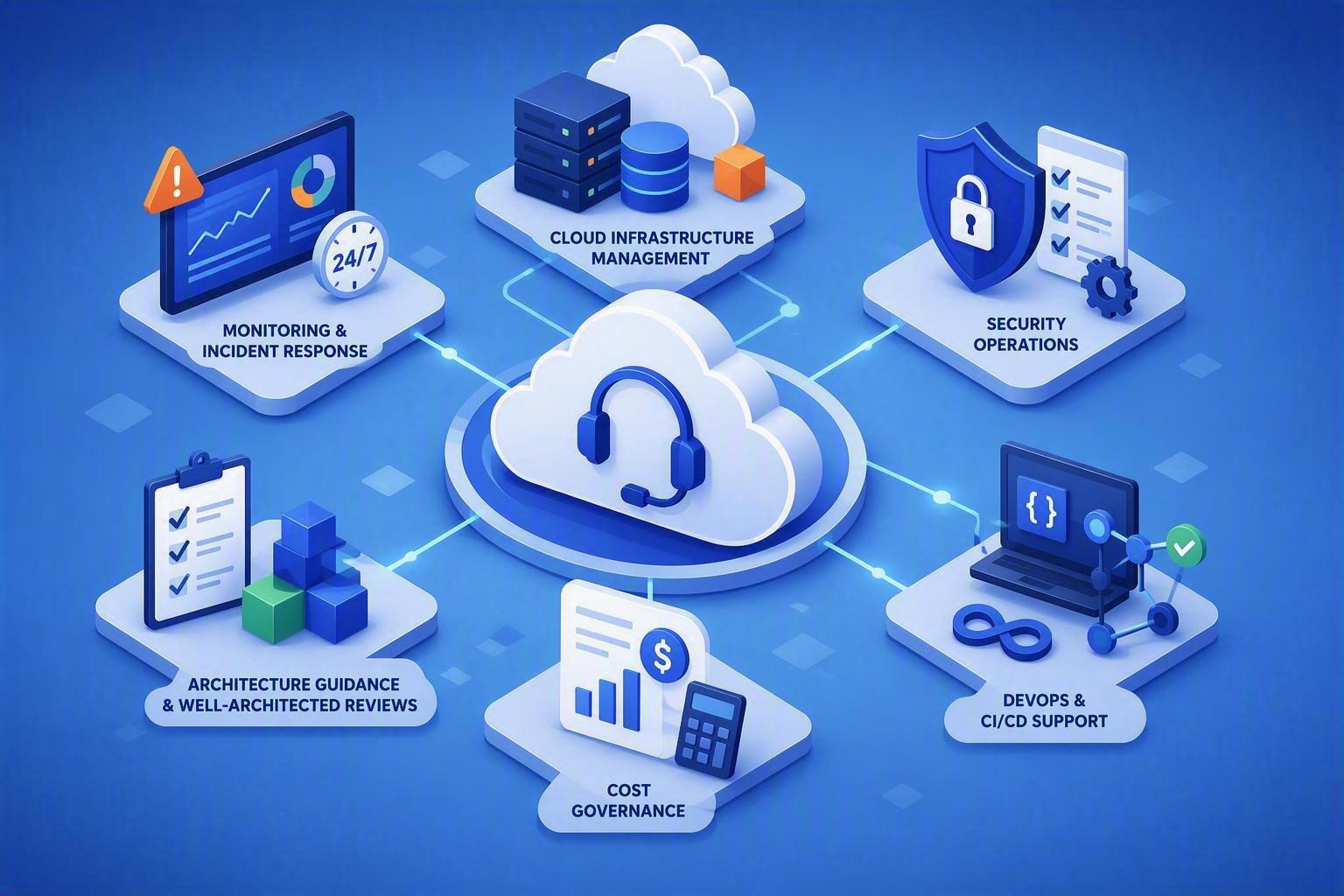
A well-defined service scope often includes:
- 24/7 or business-hours monitoring, alert triage, and incident response based on your operational requirements
- Cloud infrastructure management for services such as compute, networking, storage, databases, backup, and identity
- Security operations, including vulnerability management, access reviews, patching, logging, and incident escalation
- DevOps support for infrastructure as code, release pipelines, configuration management, and deployment reliability
- Cost governance through tagging, budget alerts, rightsizing analysis, reserved capacity planning, and waste reduction
- Architecture guidance, Well-Architected Reviews, documentation, and a prioritized improvement roadmap
Not every company needs every component from day one. A SaaS business with a small engineering team may need strong AWS, Kubernetes, CI/CD, and observability support. A regulated professional services firm may prioritize endpoint management, identity security, backup validation, compliance evidence, and secure remote access. The right service model starts with the systems that create the most business risk.
Start With Your Operating Reality, Not a Provider Package
Before evaluating providers, document how your environment operates now. This is not an exercise in producing perfect documentation. It is a way to expose gaps in ownership and determine what support must accomplish.
Identify the production systems that matter most, the cloud accounts and regions in use, critical vendors, recovery objectives, and known technical debt. Clarify which teams currently own infrastructure, application deployments, security controls, user access, and incident communications. If the answer is "it depends" or "the person who built it," managed support can provide needed structure, but only if the provider is prepared to take on that responsibility.
Next, define your support expectations in business terms. Ask how much downtime is acceptable for customer-facing systems, internal platforms, and data workflows. Determine whether a failed overnight job can wait until morning, whether a security alert requires immediate human investigation, and who has authority to approve emergency changes. These decisions shape the support window, escalation model, staffing level, and cost.
Avoid purchasing a large bundle of services simply because it sounds comprehensive. A broad offering without clear priorities can create noise and unnecessary spend. Conversely, selecting the lowest-cost monitoring plan for revenue-critical infrastructure can leave your team carrying the same operational burden with less visibility.
A Real-World Example: When Support Gaps Become Business Risks
Consider a growing SaaS company with a small internal engineering team managing customer-facing applications in AWS. The business had expanded quickly, adding new services, environments, and integrations faster than operational processes could mature.
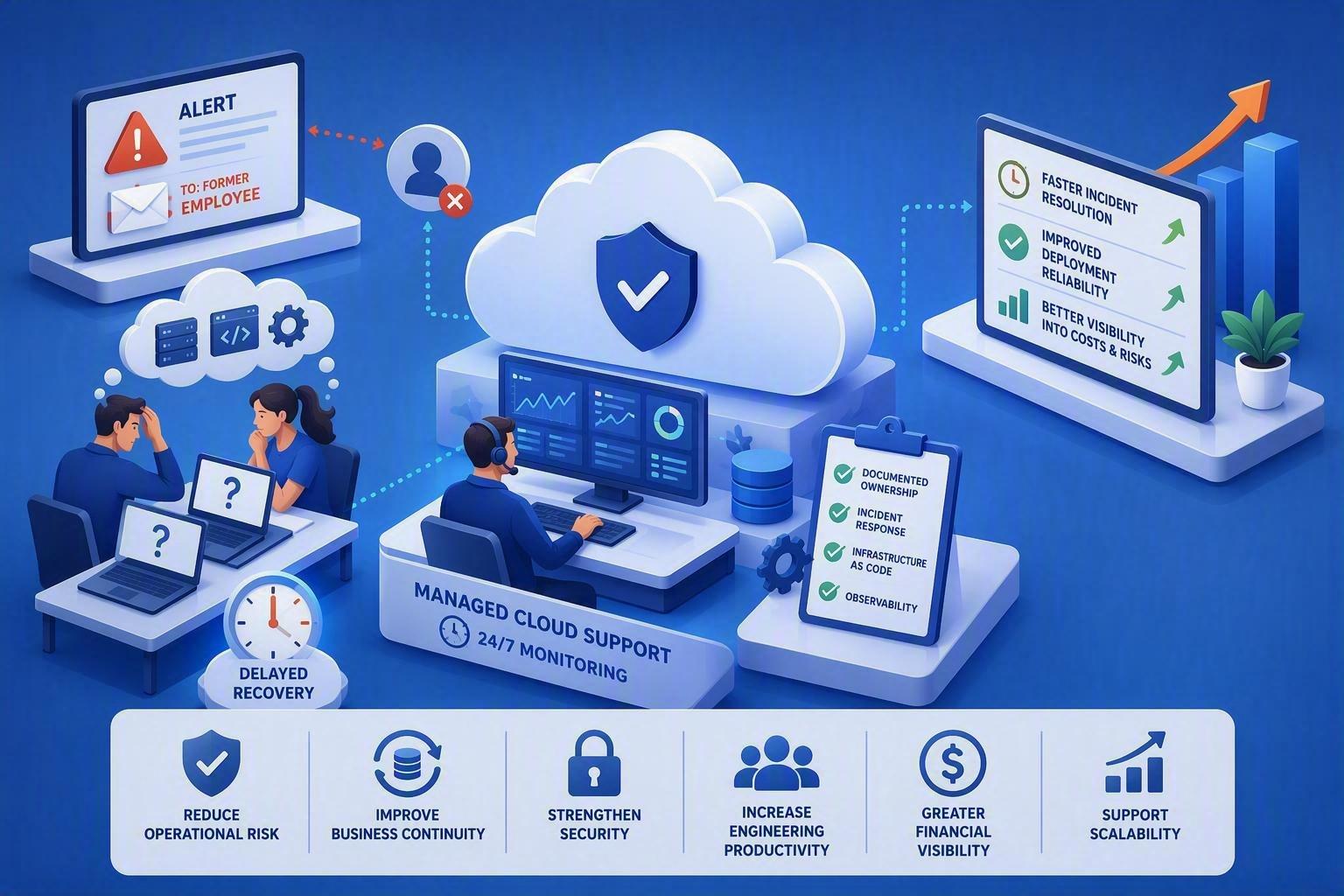
When a critical production issue occurred during a weekend deployment, alerts were generated but routed to a former employee's email address. The team spent hours determining whether the problem was infrastructure-related, application-related, or caused by a recent configuration change. Recovery was delayed because monitoring, access management, and escalation procedures were inconsistent across environments.
After engaging a managed cloud support partner, the company established 24/7 monitoring, documented ownership of critical systems, standardized incident response procedures, implemented infrastructure as code, and improved observability across the platform. Six months later, the organization reduced incident resolution times, improved deployment reliability, and gained better visibility into cloud costs and security risks.
The lesson was not that outsourcing solved every problem. Rather, structured cloud operations provided the processes, expertise, and accountability needed to support continued growth without increasing operational complexity at the same pace.
Why This Matters
Many organizations invest heavily in cloud platforms but underestimate the operational discipline required to manage them effectively over time. As environments grow, even small gaps in monitoring, security, documentation, or ownership can lead to costly downtime, compliance issues, unexpected cloud spending, or slower product delivery.
Managed cloud support helps bridge this gap by turning cloud operations into a predictable business function rather than a series of reactive firefighting exercises. Instead of relying on individual employees to remember configurations, maintain tribal knowledge, or respond to incidents after hours, businesses gain access to repeatable processes and specialized expertise.
For leadership teams, the value extends beyond technical support. Effective managed cloud services can:
- Reduce operational risk by identifying and addressing issues before they impact customers.
- Improve business continuity through tested backup, recovery, and incident response procedures.
- Strengthen security posture with ongoing monitoring, access management, and vulnerability remediation.
- Increase engineering productivity by allowing internal teams to focus on product development rather than infrastructure maintenance.
- Create greater financial visibility through proactive cloud cost governance and optimization.
- Support scalability by ensuring operational processes evolve alongside business growth.
Ultimately, cloud infrastructure is no longer just an IT concern. It directly affects customer experience, revenue generation, regulatory compliance, and organizational resilience. Choosing the right managed cloud support partner helps ensure that growth is supported by stable, secure, and well-governed operations rather than constrained by them.
How to Evaluate a Managed Cloud Support Partner
Technical credentials matter, but they are only one part of the decision. The provider must fit the way your business makes decisions, deploys software, handles risk, and plans growth.
Verify technical depth against your actual stack
Ask direct questions about the platforms you use. If your workloads run in AWS, the support team should be fluent in the AWS services central to your architecture, not merely familiar with the cloud console. If your team uses Terraform, Ansible, GitHub Actions, Kubernetes, or a particular observability tool, ask how the provider manages changes, reviews code, and troubleshoots failures in those systems.
A capable partner should explain its approach clearly. For example, they should be able to describe how infrastructure changes move from a request through review, testing, approval, deployment, validation, and rollback. They should also distinguish between urgent break-fix work and planned modernization work. Both are valuable, but they require different processes and budgets.
Examine response commitments and escalation paths
An SLA with a fast initial response time is useful, but it is not the full story. Acknowledging an alert in 15 minutes does not guarantee that the right engineer will investigate it, that the issue will be communicated properly, or that a recurring failure will be corrected.
Review severity definitions, support hours, escalation contacts, and communication standards. Confirm whether 24/7 support means active monitoring and human response, or simply an after-hours answering service. Ask how the provider coordinates with your internal engineering team, software vendors, internet service providers, and cloud provider support during a complex incident.
Also ask for the process after an event. A mature provider delivers an incident record, root cause analysis when appropriate, and clearly assigned follow-up actions. The goal is not to eliminate every outage. It is to reduce the probability and impact of the next one.
Assess security and compliance as operational work
Security cannot be a once-a-year assessment that produces a report and little else. Managed cloud support should make security controls part of normal operations: least-privilege access, MFA enforcement, central logging, patch management, encryption validation, backup testing, vulnerability remediation, and configuration monitoring.
For businesses subject to HIPAA, PCI DSS, SOC 2, or customer security reviews, determine whether the provider can help create and maintain evidence. Compliance requirements often involve technical controls, policies, change records, access reviews, and vendor management. A partner should be candid about what they can own, what remains your responsibility, and where specialist legal or audit advice is needed.
Cloud security is a shared-responsibility model. AWS secures the underlying cloud infrastructure, while your organization remains responsible for how accounts, identities, workloads, data, and configurations are managed. A support provider can operate many of those controls, but executive ownership of risk cannot be outsourced.
Look for cost accountability, not just cost reports
Cloud spend can rise for legitimate reasons: more customers, higher transaction volume, improved resilience, or expanded data retention. The objective is not to make every monthly bill smaller. It is to understand the drivers and avoid paying for capacity, licenses, storage, or data transfer that no longer serves a purpose.
Ask how the provider reports on spend, identifies anomalies, and recommends changes. Strong cloud cost management connects financial data to technical context. It distinguishes a temporary scaling event from an abandoned environment, and it explains the availability or performance trade-off before recommending a reduction.
Build the Right Governance Model
The managed service relationship works best when responsibilities are explicit. Your provider needs reliable access, accurate architecture information, timely approvals, and a designated business and technical contact. Your organization needs visibility into changes, risks, service performance, and priorities.
Establish a regular operating cadence. Monthly service reviews can cover incidents, patch status, security findings, cloud spending, backup results, capacity trends, and planned changes. Quarterly reviews should look further ahead: architectural improvements, resilience gaps, compliance milestones, product growth, and budget planning.
Do not let the provider become a black box. Insist on shared documentation, access ownership that remains under your control, and infrastructure as code wherever practical. This protects your business if staff change, systems evolve, or you need to adjust the service model later.

A Practical First 90 Days
The early phase should produce more than a handoff of credentials. During the first 30 days, the provider should inventory the environment, confirm access controls, map critical services, establish monitoring, validate backups, and identify immediate risks. By day 60, teams should have agreed incident procedures, alert routing, baseline security priorities, and a working backlog for remediation.
By day 90, you should see measurable operational progress: better visibility into production workloads, documented ownership, tested recovery procedures, improved alert quality, and a prioritized modernization plan. Advanced Vision IT approaches this work as an ongoing partnership, combining managed operations with the engineering capability needed to address the underlying causes of risk and inefficiency.
The best time to choose managed cloud support is while your team can evaluate options deliberately. Treat the decision as an investment in operating discipline, not a purchase of extra hands. The right partner gives your internal team room to build, while ensuring the infrastructure behind the business remains secure, observable, cost-aware, and ready for what comes next.
Frequently Asked Questions (FAQ)
1. What is managed cloud support, and how is it different from basic IT support?
Managed cloud support goes beyond handling tickets or monitoring infrastructure. It provides an accountable technical team that manages cloud operations, security, observability, DevOps processes, cost optimization, and ongoing improvements to your environment. The goal is to improve reliability, security, and scalability while reducing operational risk.
2. What services should a managed cloud support provider typically include?
A comprehensive managed cloud support service may include monitoring and incident response, cloud infrastructure management, security operations, DevOps support, cost governance, architecture reviews, documentation, and strategic improvement planning. The exact scope should align with your business needs and technology stack.
3. How do I determine the right managed cloud support model for my business?
Start by assessing your current operating environment, critical systems, ownership responsibilities, recovery objectives, and business risks. The best support model focuses on the systems and processes that create the greatest operational, security, or financial risk rather than purchasing the broadest available service package.
4. What should I look for when evaluating a managed cloud support provider?
Look beyond certifications and response times. Verify expertise in your cloud platform and tools, review SLA commitments, examine escalation procedures, assess security and compliance capabilities, and ensure the provider can demonstrate a clear process for managing incidents, changes, and long-term improvements.
5. How can I measure success during the first 90 days of a managed cloud support engagement?
The first 90 days should deliver tangible operational improvements, including better monitoring and visibility, documented ownership, validated backups, established incident procedures, improved security controls, tested recovery processes, and a prioritized roadmap for addressing technical debt and modernization opportunities.

Written by Alexander Boychev
Business Executive & Digital Marketing Manager at Advanced Vision IT Ltd | Published on
Alexander advises insights on business development, strategic key account management, and digital marketing in the IT sector.