



Managed Cloud Operations Guide for Growing Teams
A cloud environment can look healthy right up until a failed deployment, expired certificate, misconfigured identity policy, or surprise AWS bill exposes the gaps behind it. A managed cloud operations guide helps growing teams turn reactive infrastructure support into an operating model that protects uptime, security, delivery speed, and budget.
For small and mid-sized businesses, the challenge is rarely choosing cloud technology. AWS provides broad capability. The harder question is who owns the daily disciplines that keep those services reliable: monitoring, patching, access reviews, backup validation, cost controls, incident response, and continuous improvement. When those responsibilities are split across developers, internal IT, freelancers, and separate vendors, risk accumulates in the handoffs.
What Managed Cloud Operations Should Cover
Managed cloud operations is the ongoing technical and operational management of cloud infrastructure after it has been built or migrated. It is not simply a help desk, and it is not a one-time cloud project. The objective is to operate infrastructure as a dependable business capability while making measured improvements over time.
A capable operations program combines AWS administration, security engineering, DevOps practices, observability, and governance. It should account for production workloads as well as the supporting components that are easy to overlook: DNS, certificates, identity and access management, backups, logging, source-control permissions, CI/CD pipelines, and third-party integrations.
The exact scope depends on the business. A SaaS company may prioritize application performance, release safety, and 24/7 incident coverage. A regulated professional services firm may place greater weight on endpoint security, audit evidence, data retention, and access controls. A company with a stable line-of-business application may need cost governance and disaster recovery more urgently than a complex container platform. The service model should follow operational risk, not a generic package.
Establish clear ownership before incidents happen
The first operating decision is ownership. Every critical system needs a named owner, an escalation path, and an agreed response expectation. That includes AWS accounts, production databases, domains, backups, monitoring tools, identity providers, and vendor-managed applications.
Shared responsibility can work well, but only when it is explicit. Your engineering team may own application code while a managed partner owns infrastructure availability, security baselines, deployment automation, and alert response. Internal IT may retain employee support while a cloud operations team manages AWS landing zones and production systems. What fails is assuming someone else is watching.
Document this in a practical responsibility matrix. It should identify who approves changes, who can make emergency changes, who receives alerts, and who is accountable for recovery decisions. Keep it brief enough that people actually use it during an incident.
Build a Reliable AWS Operating Baseline
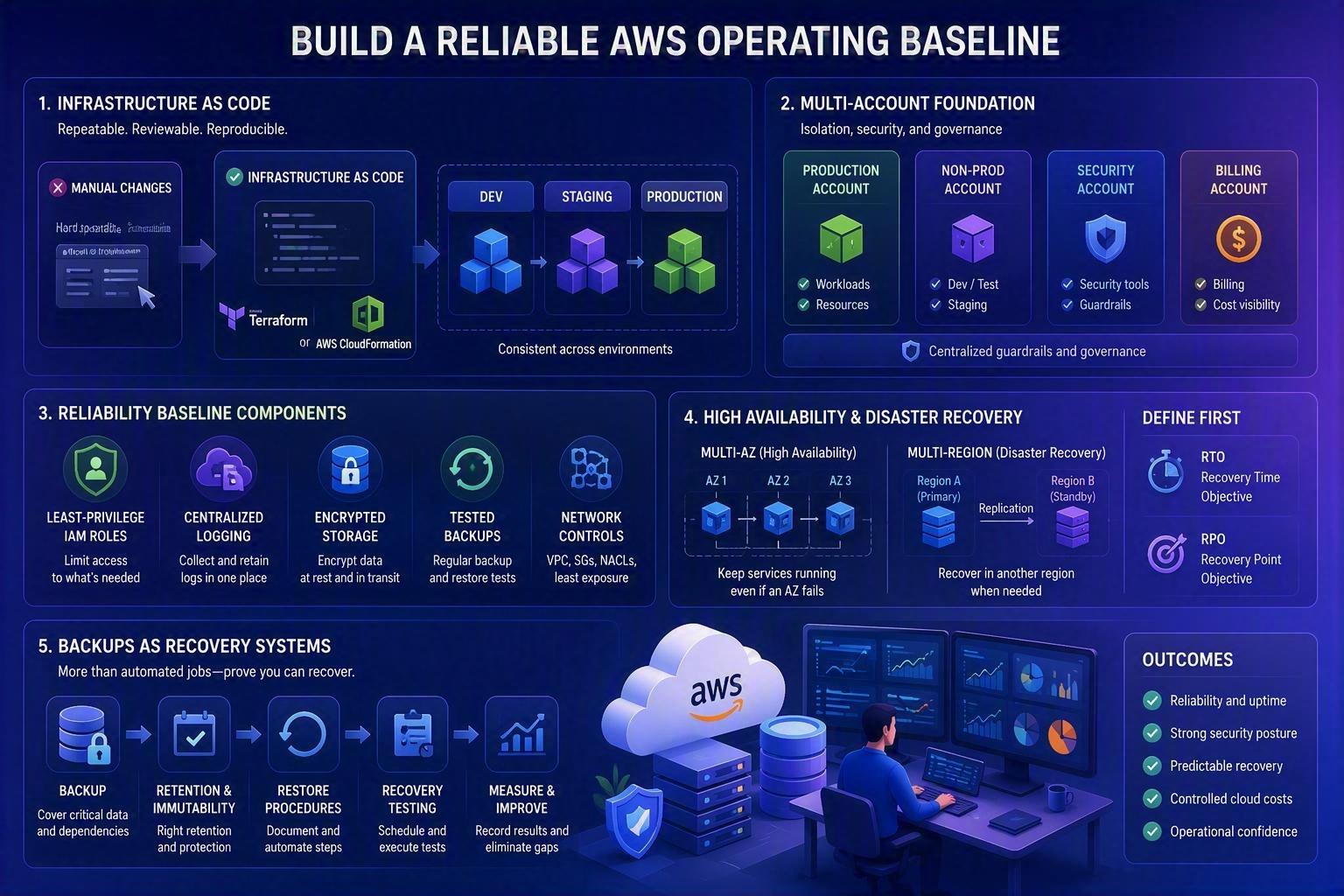
Reliability begins with repeatable architecture and configuration. Manual console changes may be acceptable during an early prototype, but they become difficult to audit, reproduce, and troubleshoot as environments grow. Infrastructure as code using Terraform or AWS CloudFormation makes configurations reviewable and repeatable across development, staging, and production.
A sound baseline generally includes separate environments, least-privilege IAM roles, centralized logging, encrypted storage, tested backups, and network controls designed around application needs. Multi-account AWS structures can improve isolation between production, nonproduction, security, and billing, although they add governance overhead. For a small team, a well-organized single account with strong guardrails may be the sensible first step. The right design is the one your organization can operate consistently.
High availability also deserves a business conversation. Running services across multiple Availability Zones is often appropriate for production systems with meaningful downtime costs. Multi-region architecture may be justified for a customer-facing platform with strict recovery requirements, but it is not automatically necessary. It introduces data replication, deployment, testing, and cost complexity. Define recovery time objectives and recovery point objectives first, then design to meet them.
Treat backups as recovery systems, not storage settings
A backup policy is incomplete until recovery has been tested. Teams often discover too late that a backup excludes a required database, cannot be restored within the recovery window, or depends on credentials no longer available during an emergency.
Operations teams should verify backup coverage, retention periods, encryption, immutability where appropriate, and restore procedures. Schedule recovery tests for the systems that would materially disrupt revenue, customer service, or compliance if lost. Record what was restored, how long it took, and what dependencies caused delays. Those results are more valuable than a dashboard showing that a scheduled backup job completed.
Make Observability Useful to People on Call
Monitoring produces value only when it helps a team recognize, diagnose, and resolve a meaningful condition. Too many alerts create fatigue; too few create blind spots. The goal is not to alert on every infrastructure metric. It is to detect customer-impacting failures and the leading indicators that allow prevention.
Start with service-level signals: availability, latency, error rates, throughput, queue depth, and key transaction success. Pair those with infrastructure indicators such as CPU, memory, storage capacity, database connections, and network errors. Centralize logs and use distributed tracing for applications where a request crosses multiple services. Platforms such as New Relic can provide a shared view across application, infrastructure, and user experience data when configured around real operational questions.
Each actionable alert should state what happened, what service is affected, the likely severity, and the first troubleshooting step. Runbooks do not need to be lengthy. A concise procedure with escalation contacts, dashboard references, rollback steps, and known dependencies can reduce response time significantly.
Review alerts after incidents. If an alert did not require action, tune or remove it. If a customer reported an issue before monitoring detected it, add or improve the signal. This is how observability becomes an operational feedback loop rather than another software subscription.
Integrate Security Into Daily Operations
Cloud security is not a quarterly checklist. New users, deployments, integrations, vulnerabilities, and configuration changes can alter exposure every week. Managed operations should include continuous review of identity, endpoint posture, cloud configuration, patching, logs, and suspicious activity.
Use least privilege as a working standard. Administrators should use role-based access with multifactor authentication rather than shared credentials or permanent broad permissions. Service accounts need only the permissions required for their workloads, and access should be reviewed when staff roles change.
Security tooling should be connected to a response process. AWS CloudTrail, CloudWatch, GuardDuty, Security Hub, vulnerability scanning, and endpoint detection can provide useful signals, but alerts without triage ownership are not a security program. Define severity levels, notification paths, containment steps, and evidence retention requirements before a real event occurs.
Compliance requirements add another layer. Whether the organization is working toward SOC 2, HIPAA, PCI DSS, or customer-specific security commitments, evidence collection should be built into operations. Configuration records, access reviews, patch reports, incident records, and backup tests are easier to maintain continuously than to reconstruct before an audit.
Control Cloud Costs Without Limiting Growth
Cloud cost optimization is a governance discipline, not a one-time savings exercise. Spend can rise for valid reasons, including customer growth, data processing, resilience improvements, or new product features. The problem is unplanned spend with no owner, no forecast, and no connection to business value.
Tag resources by environment, application, team, and cost center so leadership can understand where spending occurs. Set budgets and anomaly alerts, then review significant changes with the people who own the workload. Rightsizing, storage lifecycle policies, scheduled shutdowns for nonproduction environments, Savings Plans, and Reserved Instances can reduce waste, but each has trade-offs. A long-term commitment may save money on stable usage while reducing flexibility for an application that is being redesigned.
FinOps works best when engineering, finance, and operations share the same data. The operations team can identify technical drivers of cost, while business leaders decide whether the workload justifies the spend.
Measure the Quality of the Operating Model
A managed service should be judged by operational outcomes, not only ticket volume. Track service availability, mean time to detect, mean time to resolve, change failure rate, backup recovery success, patch compliance, security findings by severity, and cloud spend against forecast. The metrics should lead to decisions, not merely monthly reporting.
Regular service reviews are where a cloud partner earns its place. Discuss incidents and root causes, capacity needs, cost movement, security priorities, aging risks, and planned architecture changes. Advanced Vision IT approaches these reviews as an extension of the client team, connecting implementation-level work in AWS, Terraform, Ansible, CI/CD, and observability with the business priorities behind it.
The most effective next step is usually not a wholesale redesign. Start by identifying the workload whose failure would hurt the business most, validate its ownership and recovery plan, and close the most consequential operational gaps. That creates a foundation for modernization without asking your team to absorb unnecessary complexity.
User Story: From Reactive Support to Proactive Operations
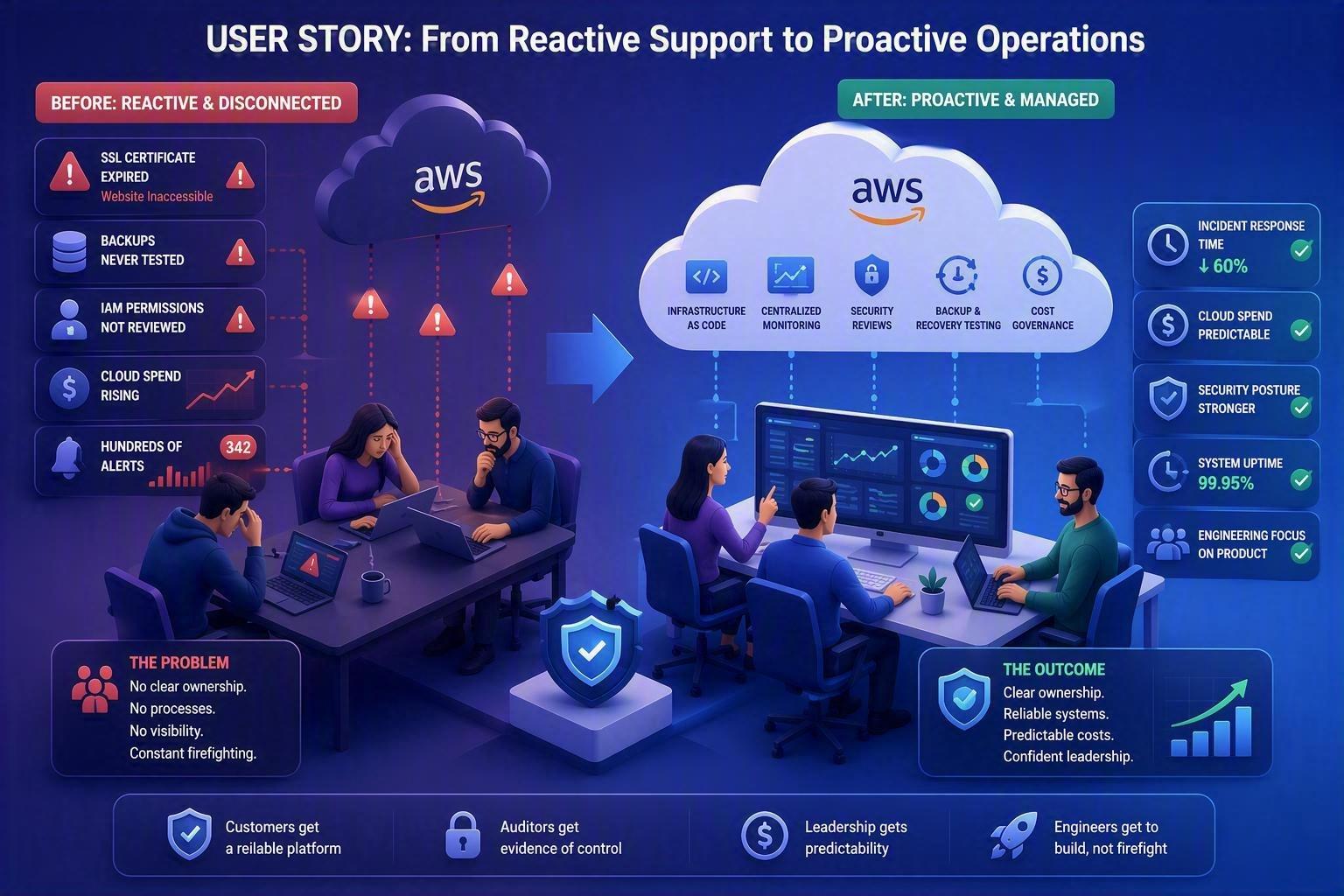
Consider the experience of a growing SaaS company with a team of 25 employees. The business had successfully migrated its application to AWS and was releasing new features quickly. Cloud responsibilities were shared between developers, an internal IT administrator, and an external contractor. For a while, everything appeared to be running smoothly.
That changed when an SSL certificate expired over a holiday weekend, making parts of the platform inaccessible to customers. During the resulting investigation, the team discovered several other operational gaps: backup restores had never been tested, IAM permissions had accumulated over time without review, cloud spending had increased significantly without clear ownership, and monitoring generated hundreds of alerts that nobody consistently acted upon.
The issue was not AWS itself or the application architecture. The problem was a lack of operational ownership and structured cloud management.
The company implemented a managed cloud operations model with clearly assigned responsibilities, infrastructure as code, centralized monitoring, regular backup recovery testing, proactive security reviews, and monthly cost governance meetings. Within six months, incident response times dropped significantly, cloud spending became predictable, and engineering teams were able to focus on product development instead of firefighting infrastructure issues.
For the leadership team, the biggest benefit was not technical. It was confidence that critical business systems were being actively monitored, maintained, and improved rather than simply assumed to be working.
Why This Matters
Cloud platforms provide powerful capabilities, but technology alone does not guarantee reliability, security, or cost efficiency. As organizations grow, operational complexity often increases faster than internal teams can manage it.
Without a structured operating model:
- Critical issues may go unnoticed until they impact customers or employees.
- Security risks can accumulate through outdated permissions, unpatched systems, or configuration drift.
- Backup strategies may provide a false sense of security if recovery procedures are never tested.
- Cloud costs can rise unexpectedly without governance or accountability.
- Engineering teams spend valuable time resolving preventable operational issues instead of delivering business value.
A mature managed cloud operations program reduces these risks by establishing clear ownership, proactive monitoring, security controls, recovery processes, and continuous improvement practices. The result is better uptime, stronger security, predictable cloud spending, and greater confidence in the systems that support the business.
For many organizations, operational excellence becomes a competitive advantage. Customers expect reliable services, auditors expect evidence of control, and leadership expects technology investments to support growth rather than create uncertainty.
Frequently Asked Questions (FAQ)
1. What is managed cloud operations?
Managed cloud operations is the ongoing management, monitoring, maintenance, security, and optimization of cloud infrastructure after it has been deployed. It focuses on keeping systems reliable, secure, and cost-effective while supporting business growth.
2. How is managed cloud operations different from cloud migration services?
Cloud migration is a project with a defined start and end point. Managed cloud operations begins after migration and provides continuous oversight of infrastructure, security, performance, backups, cost management, and incident response.
3. Do small businesses really need managed cloud operations?
Yes. Smaller organizations often have limited internal resources and may rely on developers or IT staff to manage cloud environments alongside other responsibilities. A managed operations model helps ensure critical tasks such as monitoring, patch management, access reviews, and backup testing are consistently performed.
4. What AWS services are typically included in managed cloud operations?
The scope varies by organization but often includes services such as AWS IAM, EC2, RDS, VPC, CloudTrail, CloudWatch, GuardDuty, Security Hub, Route 53, backup management, CI/CD pipelines, logging platforms, and infrastructure-as-code environments.
5. How do you measure the success of a managed cloud operations program?
Success is typically measured through operational outcomes, including:
- Service availability and uptime
- Mean time to detect (MTTD)
- Mean time to resolve (MTTR)
- Change failure rate
- Backup recovery success rates
- Security findings and remediation timelines
- Cloud spend compared to budget and forecast
Strong programs focus on improving these metrics over time while aligning operational activities with business objectives.

Written by Alexander Boychev
Business Executive & Digital Marketing Manager at Advanced Vision IT Ltd | Published on
Alexander advises insights on business development, strategic key account management, and digital marketing in the IT sector.